Microsoft has announced the end of support for all existing Exchange on-prem products. They announced also the launch of the Exchange SE. Exchange SE after October 14th, 2025, is the only supported version by Microsoft. You will find here how to migrate to Exchange SE with a complete visual guide.
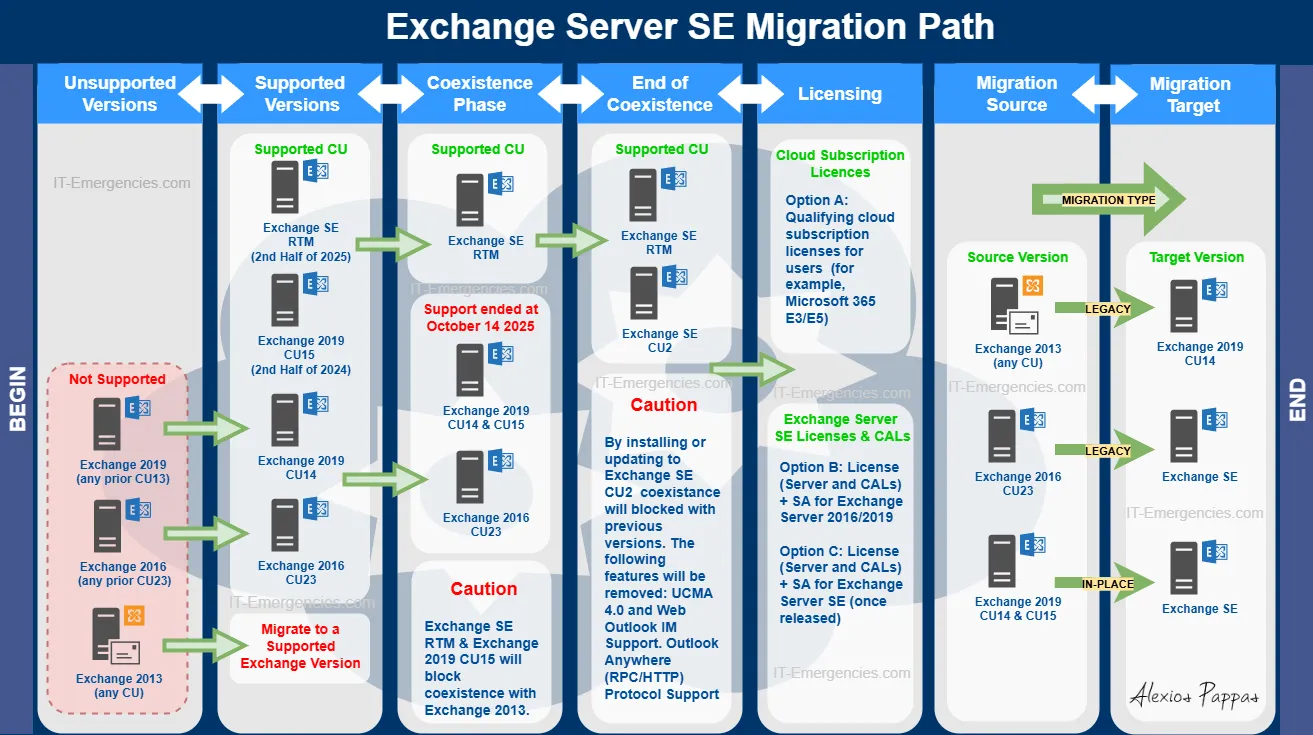
Exchange SE Upgrade path:
Planning an Exchange SE migration in production?
A migration path can look straightforward on paper, but environment-specific issues can introduce unexpected risk.
Already have an internal IT team? No problem — we can work alongside your engineers.
Prerequisites
Exchange 2016 CU23 or Exchange 2019 CU14 & CU15 are the least required version to proceed. If you are on a different version, you will have to migrate/update to the ones mentioned above.
Exchange SE RTM is the recommended initial version for installation. If you use Exchange SE CU2 (or later) the coexistence with previous versions will stop working.
Key points:
- After October 14 2025 all previous exchange versions are out of support.
- The Exchange SE CU2 version blocks the coexistence with all previous versions.
- Exchange 2019 CU15 blocks coexistence with Exchange 2013.
- The new Exchange SE version needs a subscription to get support and updates.
Conclusion:
Exchange SE is a rebranding of the Exchange 2019. This is expected to change with the introduction of new security features soon with upcoming CUs. Microsoft switches the on-prem version in subscription based applications. This is an end of an era and might signal for changes in the Windows Server licensing in the future.
Hopefully the how to migrate to Exchange SE visual guide will help you get decisions for your next steps with your exchange server architecture. As subscription costs snowballing the last years I have written also an article on saving cost strategies for Azure give a check here.
For detailed instructions on the migration path, check the infographic I created above or visit this official Exchange Team’s article from Microsoft.
Planning an Exchange SE Migration?
Find the risks before they become downtime.
Tell us a few details about your current Exchange environment. A senior engineer will review your setup and identify the main areas we would validate before migration.
- Upgrade and migration path
- Coexistence risks
- Hybrid configuration
- Certificates and namespaces
- Mail flow considerations
- Pre-cutover risks
Already have an internal IT team? No problem — we can work alongside your engineers for planning, validation, escalation or implementation support.
Free. No obligation. Human-reviewed by a senior engineer.
FAQ
No you will have to have Exchange 2016 CU23 with coexistence with Exchange SE in order to migrate all the data to SE version.
Check the infographic above that I have the full details for all the existing scenarios.
No if there is no Exchange in your environment you install directly Exchange SE version.

About Alexios Pappas – Alexios Pappas has worked internally in IT Departments in multi-role technical and management positions for many years. In parallel, Alexios led IT multinational projects across several countries globally as an IT Freelancer. He repeatedly got Top Rated Plus distinction and also 100% satisfaction rate for over one and a half-decade, resulting from the Client’s feedback. Since 2015 he has been focused on informing and helping Businesses that want to improve and excel in their IT Section.
© 2026 IT-Emergencies. All rights reserved.
Unauthorized copying, reproduction, or republication of this article is prohibited, except as permitted by applicable law or with prior written permission.
Original source: Migrating to Exchange SE: The Upgrade Path from Exchange 2016/2019